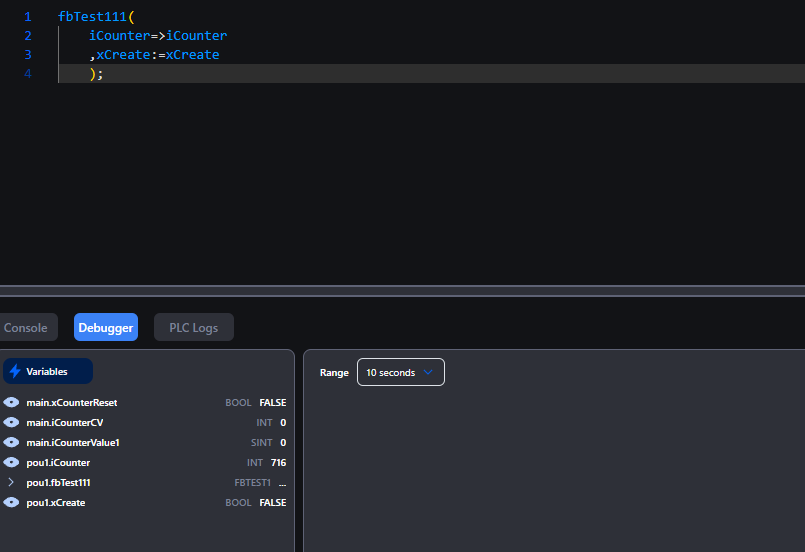
In 2026, OpenPLC V4 from AUTONOMY received a major update, with V4 officially released for both the Editor and Runtime! In this series, we’ll be running various tests and verifications using OpenPLC V4 hands-on. In Episode 4, we’ll walk through creating an Orchestrator from the Autonomy Edge Platform and then setting up a vPLC.
Let’s enjoy FA!
Foreword
Thank you from the bottom of my heart for visiting my technical blog and YouTube channel.
We are currently running the “Takahashi Chris” radio show with Full-san (full@桜 八重 (@fulhause) / X) which I deliver every Wednesday night.
Sharing, not hoarding, technical knowledge
We publish technical information related to factory production technology and control systems for free, through blogs and videos.
With the belief that “knowledge should be accessible to everyone,” we share practical know-how and real-world troubleshooting cases from our own field experience.
The reason we keep it all free is simple: to help reduce the number of people who struggle because they simply didn’t know.
If you’ve ever thought:
- “Will this PLC and device combination actually work?”
- “I’m having trouble with EtherCAT communication—can someone test it?”
- “I want to try this remote I/O, but we don’t have the testing environment in-house…”
Feel free to reach out!If lending equipment or sharing your configuration is possible, we’re happy to verify it and share the results through articles and videos.
(We can keep company/product names anonymous if requested.)
How can you support us?
Currently, our activities are nearly all unpaid, but creating articles and videos takes time and a proper testing environment.If you’d like to support us in continuing and expanding this content, your kind help would mean a lot.
Membership (Support our radio show)
This support plan is designed to enhance radio with Mr Full.
https://note.com/fulhause/membership/join
Amazon Gift List (equipment & books for content production)
Lists equipment and books required for content creation.
https://www.amazon.co.jp/hz/wishlist/ls/H7W3RRD7C5QG?ref_=wl_share
Patreon (Support articles & video creation)
Your small monthly support will help to improve the environment for writing and verifying articles.
https://www.patreon.com/user?u=84249391
Paypal
A little help goes a long way.
https://paypal.me/soup01threes?country.x=JP&locale.x=ja_JP
Just trying to share things that could’ve helped someone—if only they’d known.
Your support helps make knowledge sharing more open and sustainable.
Thank you for being with us.
soup01threes*gmail.com
Technical knowledge shouldn’t be kept to ourselves.
Reference Link
http://soup01.com/en/category/openplc_en/
Autonomy Edge
Autonomy Edge is a cloud-based platform for industrial automation that brings modern software development practices to PLC programming. Without requiring dedicated hardware or proprietary software installation, you can develop, deploy, and manage automation programs entirely through a web browser.
Why Autonomy Edge?
Traditional PLC development required expensive hardware, proprietary software licenses, and physical access to devices. Autonomy Edge removes these barriers by providing:
Browser-Based Development: Create PLC programs in industry-standard IEC 61131-3 languages without installing any software.
Virtual PLC: Deploy automation logic in real time to physical devices (PLCs, PACs, industrial PCs, servers) running containerized runtime instances.
Remote Management: Deploy programs and monitor devices from anywhere with an internet connection. (Internet is only required for management operations — not for executing control logic.)
Cloud Collaboration: Share projects with team members and automatically manage version history.
Platform Architecture
The Autonomy Edge ecosystem consists of four key components that work together:
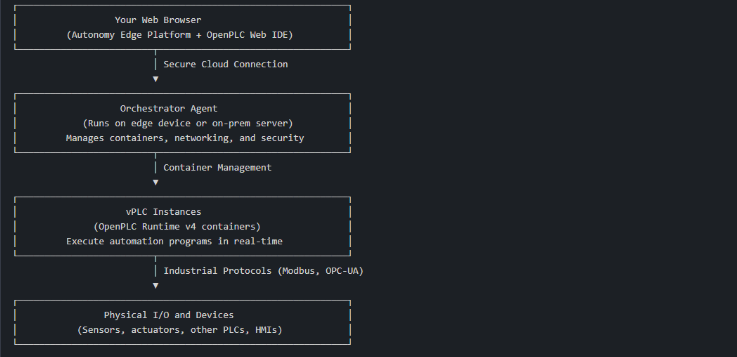
Autonomy Edge Platform
A cloud-based web application that manages projects, users, and devices. It includes the browser-based OpenPLC Editor IDE for creating automation programs.
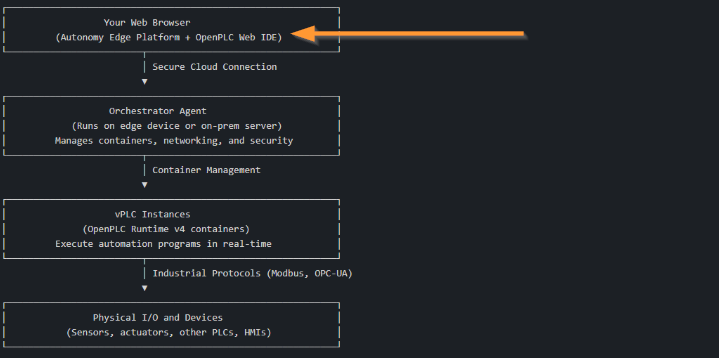
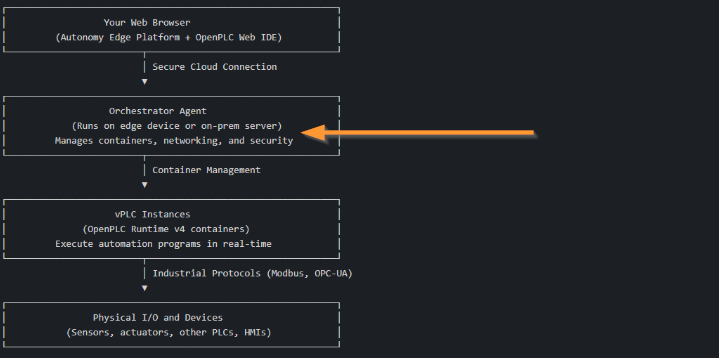
Orchestrator
An agent running on edge devices (Linux-based PLCs, PACs, industrial PCs, on-premises servers, etc.) that manages vPLC instances. It maintains secure connectivity to the cloud and handles container orchestration, networking, and system monitoring.
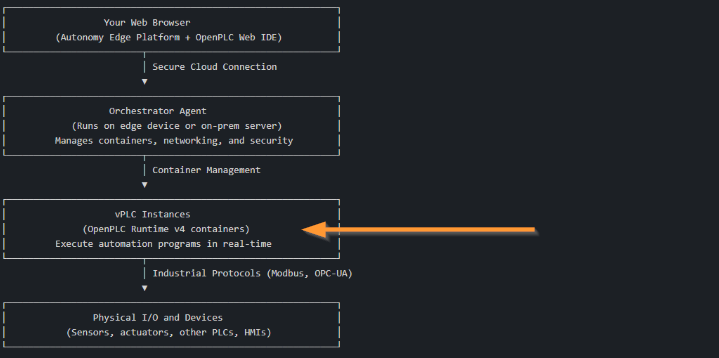
vPLC (Virtual PLC)
A containerized instance of OpenPLC Runtime v4 that executes automation programs. Each vPLC operates independently and can communicate with physical devices via various industrial protocols.
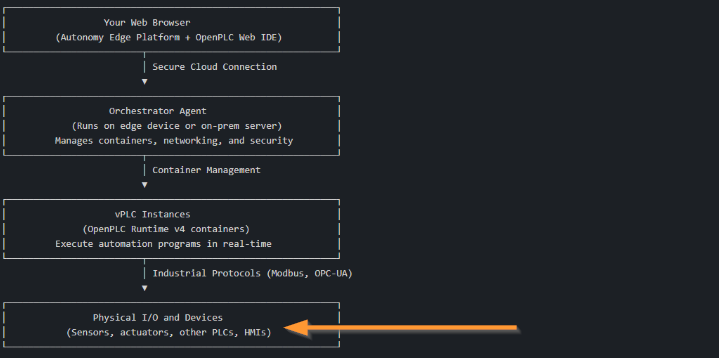
Physical I/O and Devices
Sensors, actuators, remote I/O modules, HMIs, and other industrial equipment connected to vPLCs via industrial protocols such as Modbus TCP/IP, Modbus RTU, EtherCAT, and EtherNet/IP.
Orchestrators?
The Orchestrator agent is one of the core components of the Autonomy Edge platform and is essential for executing PLC programs on physical hardware.
If the Orchestrator agent is not installed on an edge device, the Autonomy Edge platform cannot connect to or control the local PLC runtime.
The Orchestrator acts as a secure bridge between the cloud-based Autonomy Edge application and industrial automation equipment, enabling remote deployment and management of PLC programs from anywhere in the world.
Why Orchestrators Are Essential
The Autonomy Edge platform is designed as a cloud-first solution for creating and editing PLC programs through a web browser. However, to actually run these programs on real hardware and interact with physical I/O, a means of bridging the gap between the cloud and the local industrial network is required. This is exactly the role the Orchestrator agent fulfills.
When you deploy a PLC program from Autonomy Edge, the request flows from the cloud platform through the Orchestrator agent to the OpenPLC runtime running on the edge device. The Orchestrator handles all the complex processing — secure communications, container management, and network configuration — allowing users to focus on developing automation logic without being burdened by infrastructure concerns.
What Does the Orchestrator Do?
The Orchestrator handles several critical functions in your automation infrastructure.
Remote Device Management
Creates and manages virtual PLC containers (vPLCs) on the local machine. These vPLCs run the OpenPLC runtime and can execute PLC programs just like physical industrial controllers.
Secure Cloud Communication
Maintains a persistent, encrypted connection to the Autonomy Edge cloud using mutual TLS (mTLS) authentication. This ensures that only authorized devices can connect to your account, and that all communications are protected from eavesdropping and tampering.
System Monitoring
Continuously reports system health metrics such as CPU usage, memory consumption, disk space, and uptime. These metrics are displayed in real time on the Autonomy Edge platform, allowing you to monitor the status of edge devices from anywhere.
Network Integration
Virtual PLC devices created by the Orchestrator can be configured to appear as physical devices on the local network using MACVLAN networking. This enables direct communication with other industrial equipment using standard protocols such as Modbus TCP.
Dynamic Network Adaptation
When the host machine moves between different networks (for example, in portable industrial systems), the Orchestrator automatically detects network changes and reconfigures vPLC containers to maintain connectivity.
Offline Operation and Local Network Access
One of the key characteristics of the Orchestrator architecture is that an internet connection is only required for remote monitoring and management. As long as vPLC instances are running PLC programs, all control logic executes locally on the edge device. This means that even if the internet connection is lost, PLC programs will not stop — automation continues to operate normally, maintaining control of physical I/O and communication with other devices on the local network.
What is lost when the internet connection is interrupted is the ability to monitor vPLC instances, upload new programs, create new vPLCs, or check system metrics via the Autonomy Edge cloud platform. However, all of these operations can still be performed from the local network without internet access.
Each vPLC instance runs the exact same OpenPLC runtime as a physical PLC device with OpenPLC Runtime installed. This means you can connect directly to a vPLC instance using the OpenPLC Editor desktop software from any computer on the same local network. From the perspective of OpenPLC Editor, there is no difference between a vPLC device created and managed by the Autonomy Edge Orchestrator agent and an actual OpenPLC Runtime running on dedicated PLC hardware.
This design ensures operational resilience for industrial applications where continuous operation is critical. Automation logic continues to run regardless of internet availability, and local network access is always available as a fallback for monitoring and programming.
Architecture Overview
The Orchestrator system consists of two Docker containers that work together. Both containers operate under an automatic restart policy, ensuring that the automation infrastructure continues to run even in the event of a system restart or unexpected failure.
Orchestrator Agent
This is the main control daemon, responsible for handling communication with the Autonomy Edge cloud, managing vPLC containers, and coordinating all orchestration activities.

Network Monitor
This companion container monitors the host’s physical network interfaces and manages DHCP clients for vPLC containers. This container enables the dynamic network adaptation feature that maintains vPLC connectivity even as network conditions change.

When to Use the Orchestrator
We recommend deploying the Orchestrator when you want to: remotely manage PLC programs on edge devices without physical access; deploy and update automation logic across multiple sites from a central location; monitor the health and status of industrial computing infrastructure; create virtual PLC devices capable of communicating with physical industrial equipment; or maintain a secure, authenticated connection between edge devices and the cloud.
System Requirements
Before installing the Orchestrator, ensure the target machine meets the following requirements:
Operating System
Linux is required. The installer supports major distributions including Ubuntu, Debian, Red Hat Enterprise Linux (RHEL), CentOS, and Fedora.
Permissions
Root or sudo access is required for installation. The installer needs elevated privileges to install Docker (if not already installed), create system directories, and configure Orchestrator containers.
Docker
Docker must be installed and running. If Docker is not installed, the installer will attempt to install it automatically using the system’s package manager.
Network Access
Internet access is required during installation to download container images and communicate with the Autonomy Edge provisioning service. After installation, continued internet access is needed to maintain connectivity with the cloud platform.
Hardware
The Orchestrator itself has minimal resource requirements. However, sufficient resources must be available for the vPLC containers you plan to run. Each vPLC typically requires approximately 256 MB of RAM and minimal CPU resources during normal operation.
Installer
The installer automatically detects and installs any missing dependencies such as curl, jq, openssl, and Docker.
Compatible Industrial Equipment
The Orchestrator agent is designed for broad compatibility with any Linux device that has shell access and can run Docker containers, making it suitable for deployment on a wide variety of industrial hardware — from dedicated edge controllers to industrial PCs.
Common requirements across all devices are: a supported Linux distribution (Ubuntu, Debian, RHEL, CentOS, or Fedora), the ability to run Docker containers, shell access with root or sudo privileges, and network connectivity to the internet. Before deploying to a specific industrial device, verify that your device’s firmware permits Docker installation and that you have the necessary access rights.
Linux-Based PLCs and Edge Controllers
Many modern industrial controllers run Linux and provide terminal access, making them ideal candidates for running the Orchestrator agent. Examples include: Siemens IOT2050 industrial edge devices, Opto 22 groov EPIC and groov RIO controllers, WAGO PFC200 series controllers, Phoenix Contact PLCnext controllers, Revolution Pi (Kunbus) industrial Raspberry Pi modules, and Hilscher netPI edge gateways.
Industrial PCs and Edge Gateways
Rugged industrial computers running Linux distributions make ideal Orchestrator hosts. Representative options include: Advantech UNO and ARK series industrial PCs, OnLogic industrial computers, Kontron embedded PCs, Moxa industrial computers and gateways, and Axiomtek and AAEON industrial box PCs.
General-Purpose Linux Systems
For development, testing, or less demanding applications, the Orchestrator can run on any standard Linux system — including server hardware, desktop computers, or single-board computers such as the Raspberry Pi (for evaluation purposes).
Security Model
The Orchestrator employs a robust security model based on mutual TLS (mTLS) authentication.
Certificate-Based Identity
Each Orchestrator is assigned a unique identifier at installation. This identifier is embedded in an RSA-4096 certificate, which the Orchestrator uses to authenticate with the cloud.
Mutual Authentication
Both the Orchestrator and the cloud server verify each other’s identity before establishing a connection. This prevents unauthorized devices from connecting to your account and protects against man-in-the-middle attacks.
Encrypted Communication
All data transmitted between the Orchestrator and the cloud is encrypted using TLS 1.2 or higher.
Security Credential Storage
The Orchestrator’s private key is stored in a protected directory with restricted file permissions (600), ensuring that only the Orchestrator process can access it.
What is a vPLC?
A virtual PLC (vPLC) is a software-based programmable logic controller running inside a Docker container on the Orchestrator’s host machine. It delivers the same functionality as a physical PLC while combining the flexibility and scalability inherent to containerized applications.
A vPLC is a containerized instance of OpenPLC Runtime, running on an edge device managed by the Orchestrator agent. Each vPLC operates as an independent PLC and can execute programs written in IEC 61131-3 languages such as Structured Text, Ladder Diagram, and Function Block Diagram.
When you create a vPLC through the Autonomy Edge platform, the Orchestrator agent automatically provisions a new Docker container with the OpenPLC Runtime software. This container runs independently on the host machine and can be managed remotely through the platform.
Key Benefits
Rapid Deployment
Create new PLC instances in seconds without any physical hardware installation. Simply configure the network settings and the vPLC is immediately ready to execute programs.
Scalability
Run multiple vPLCs on a single edge device, each with its own network configuration and program. This allows you to consolidate automation workloads and reduce hardware costs.
Remote Management
Monitor, configure, and update vPLCs from anywhere through the Autonomy Edge platform. Upload new programs, check status, and view runtime statistics without physical access to the device.
Consistency
Since all vPLCs run the same OpenPLC Runtime software, consistent behavior is guaranteed across all automation projects. A program developed and tested on one vPLC will run exactly the same way on any other vPLC.
Integration with OpenPLC Editor
The OpenPLC Editor built into Autonomy Edge connects directly to vPLCs via the Orchestrator agent. This seamless integration allows you to develop, compile, and deploy programs in one continuous workflow without ever leaving the platform.
How It Works
When you create a vPLC, the following processes take place in the background.
First, the Autonomy Edge platform sends a request to the Orchestrator agent running on the edge device. The Orchestrator agent then creates a new Docker container using the OpenPLC Runtime image. The container is configured based on the specified network settings (DHCP or static IP). The vPLC then starts up and becomes ready to accept program uploads.
The Orchestrator agent continuously monitors the vPLC containers and reports their status to the platform. Real-time information such as the execution state, network configuration, and resource usage of each vPLC can be viewed directly on the platform.
vPLC vs Physical PLC
vPLCs and physical PLCs serve the same fundamental purpose — executing automation programs to control industrial processes. However, there are several important differences to consider.
Network Configuration
vPLCs use a virtual network interface (vNIC) that can be configured with DHCP or a static IP address. The Orchestrator agent manages the network bridge that connects the vPLC to the physical network.
I/O Access
Physical PLCs can directly access hardware I/O modules. vPLCs, on the other hand, access I/O via network protocols such as Modbus TCP/IP, communicating with remote I/O devices or other PLCs on the network.
Performance
vPLCs share the CPU and memory resources of the host machine. For applications requiring time-critical control, ensure the edge device has sufficient resources to maintain consistent scan cycle times.
Portability
vPLC programs can be easily migrated between different edge devices. Simply create a new vPLC on another Orchestrator and upload the same program — that’s all it takes.
Compatibility with OpenPLC Editor Desktop
vPLCs run the exact same OpenPLC Runtime as physical devices with OpenPLC installed. This means you can also connect to a vPLC using the OpenPLC Editor desktop application from any computer on the same local network.
This is particularly useful in the following scenarios: offline operation when internet connectivity is unavailable, local debugging and monitoring, and integration with existing OpenPLC workflows.
From the OpenPLC Editor desktop application, there is no visible difference between a vPLC and a physical OpenPLC device, so all features work in exactly the same way.
Implementation
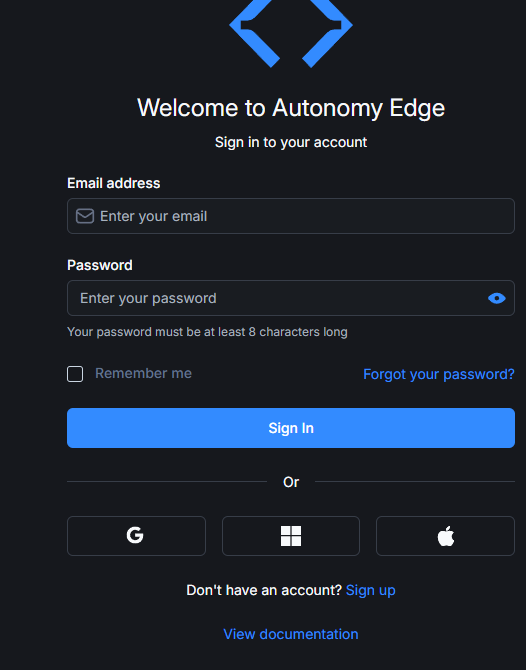
Create an Autonomy Edge Account
Access the site below and create an Autonomy Edge account.
Done!
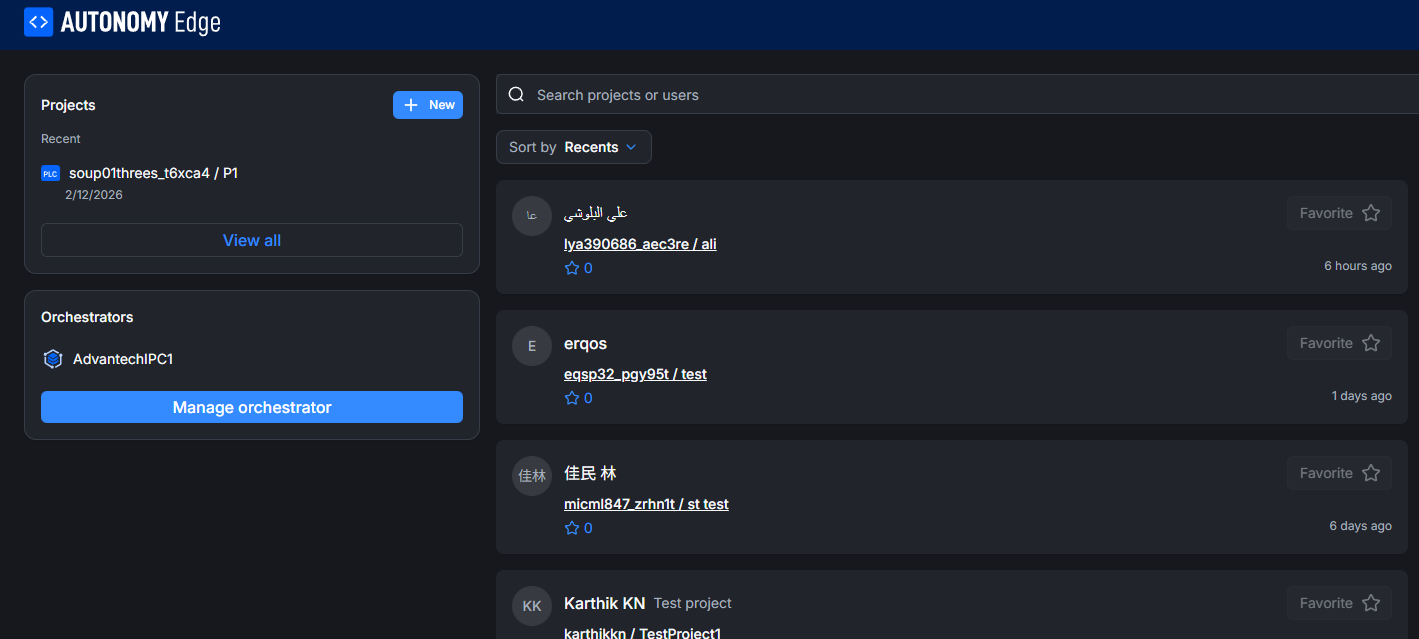
Orchestrator Management
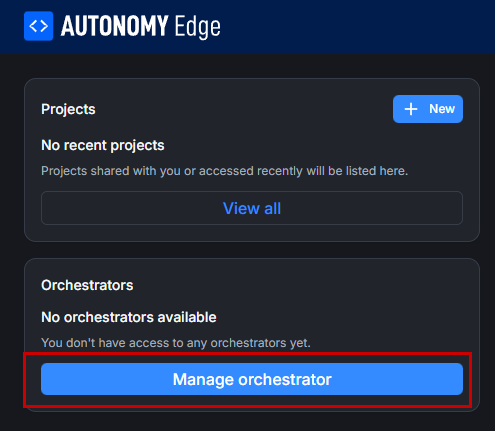
Next, click “Manage orchestrator” to the left of Autonomy Edge.
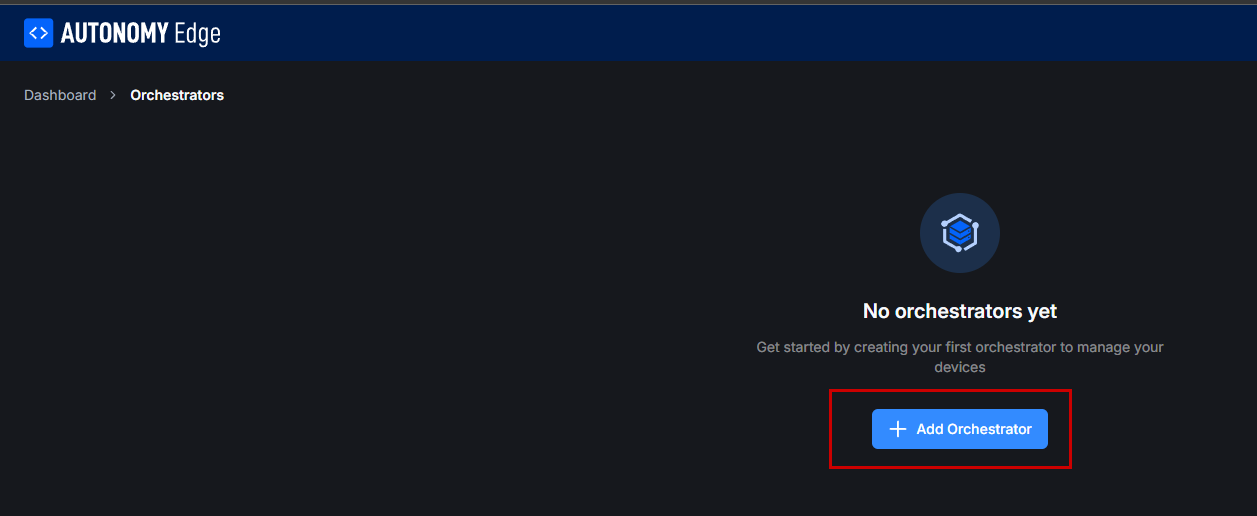
The Orchestrotors management screen appears. Click “+Add Orchestrotors”.
The Orchestrotors settings screen will appear.
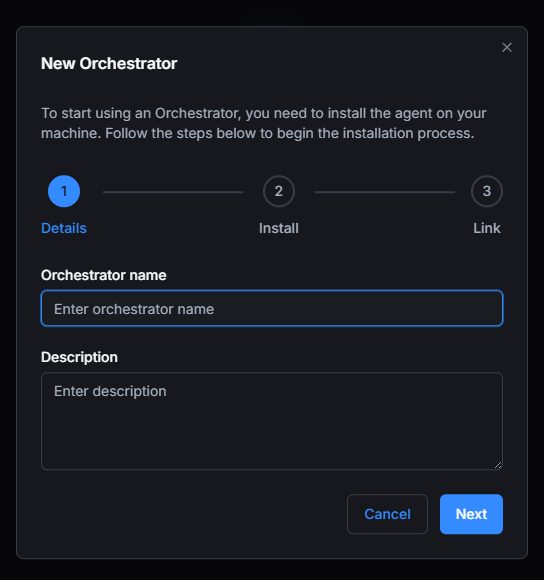
Enter the Orchestrotor name and proceed with Next.
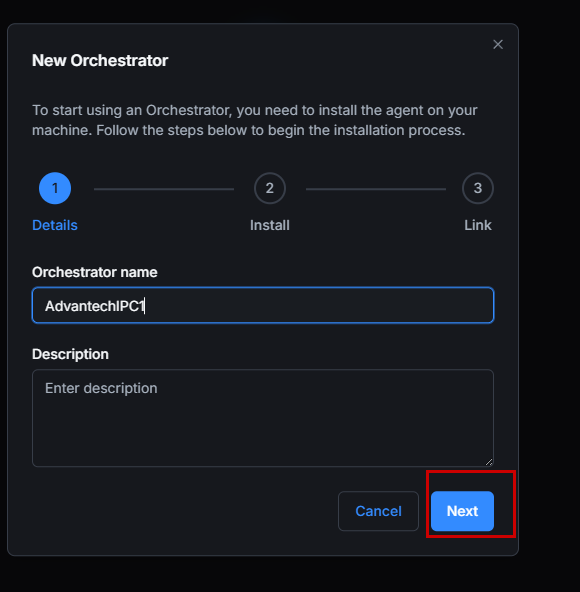
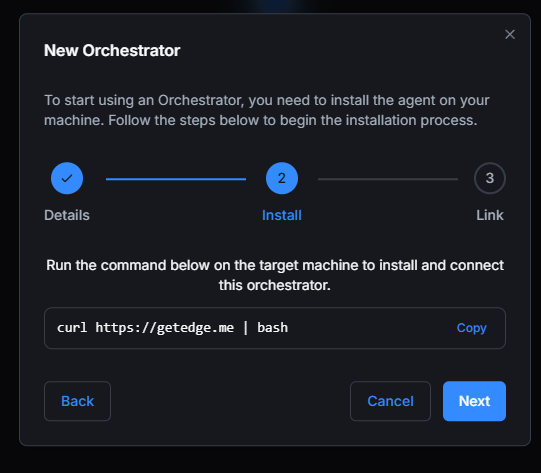
Next, the command to install the Agent will be displayed. Copy this command.
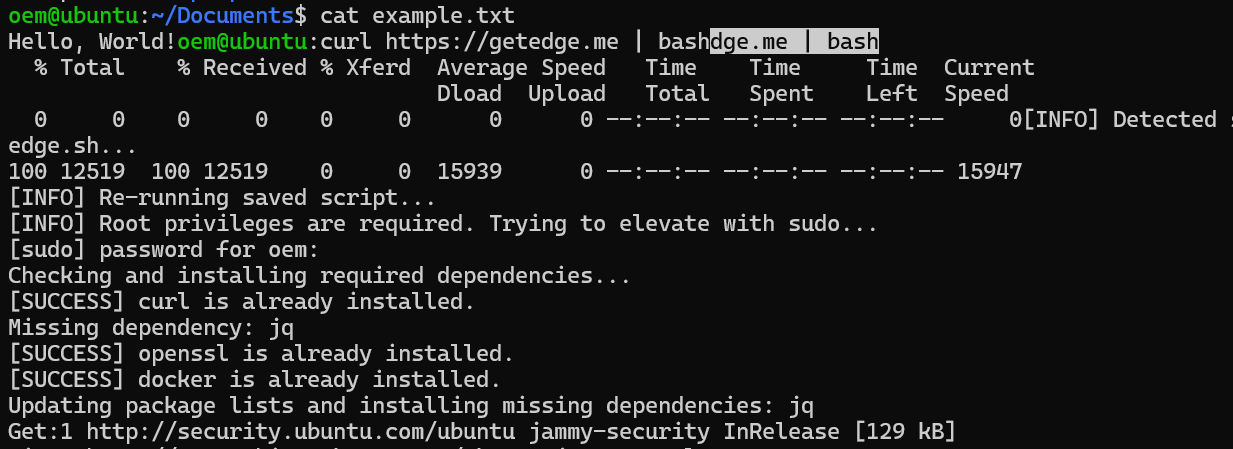
Execute that command on the machine.
Done!Once installation is complete, your Orchestrotor ID will be displayed.
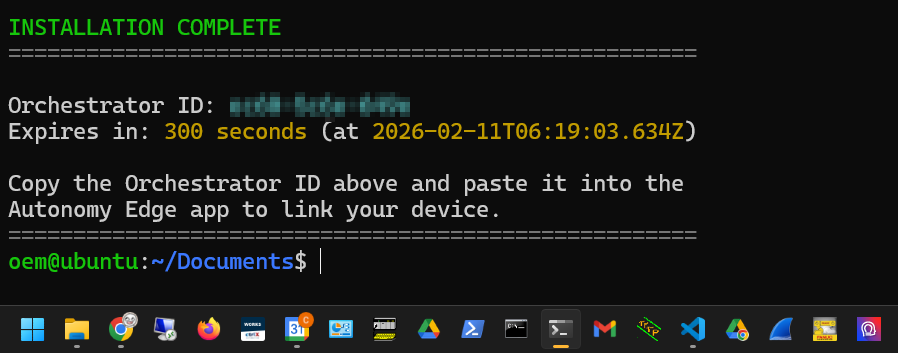
Paste that ID.
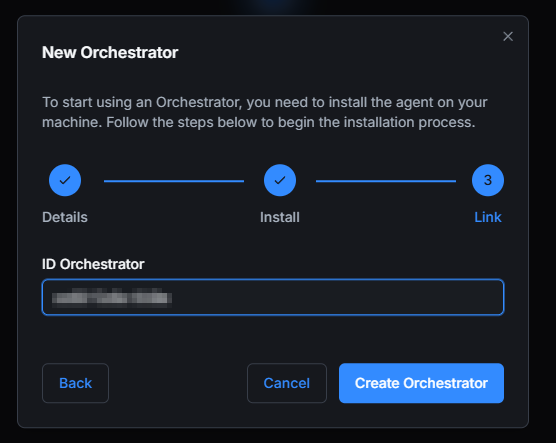
Done!So I created Orchestrotors.
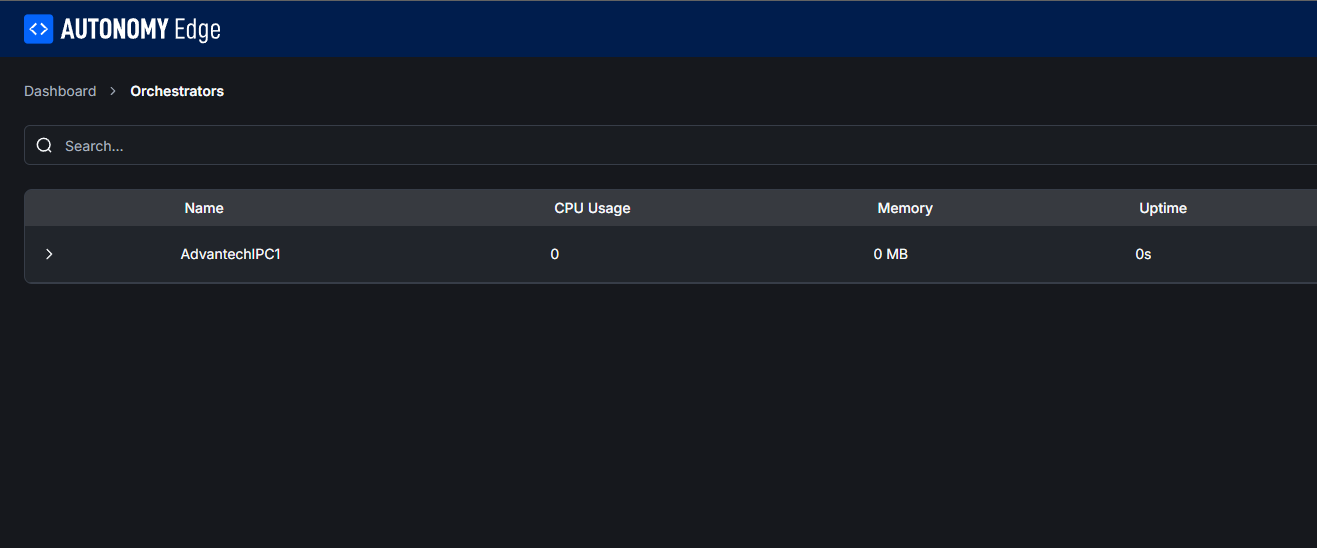
Add Devices
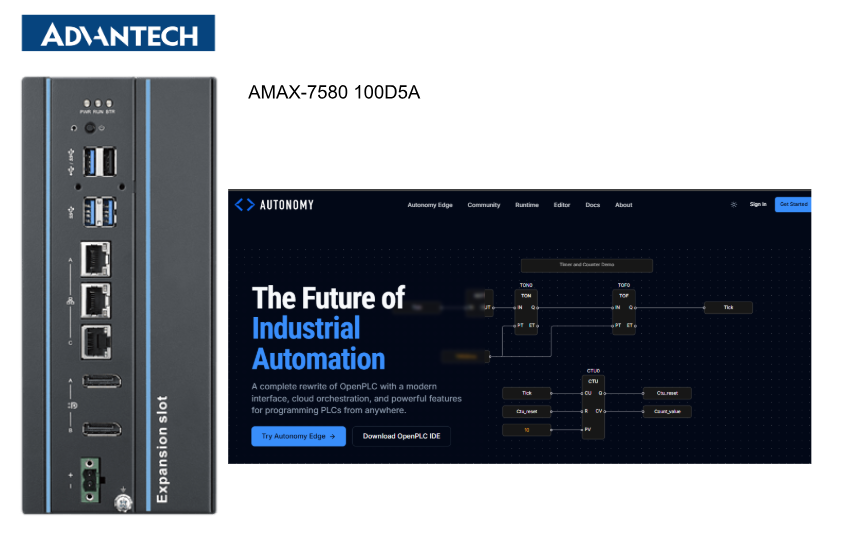
Next, click Orchestrotors, which you added to the Advantech IPC earlier, then add a new vPLC via Add Devices.
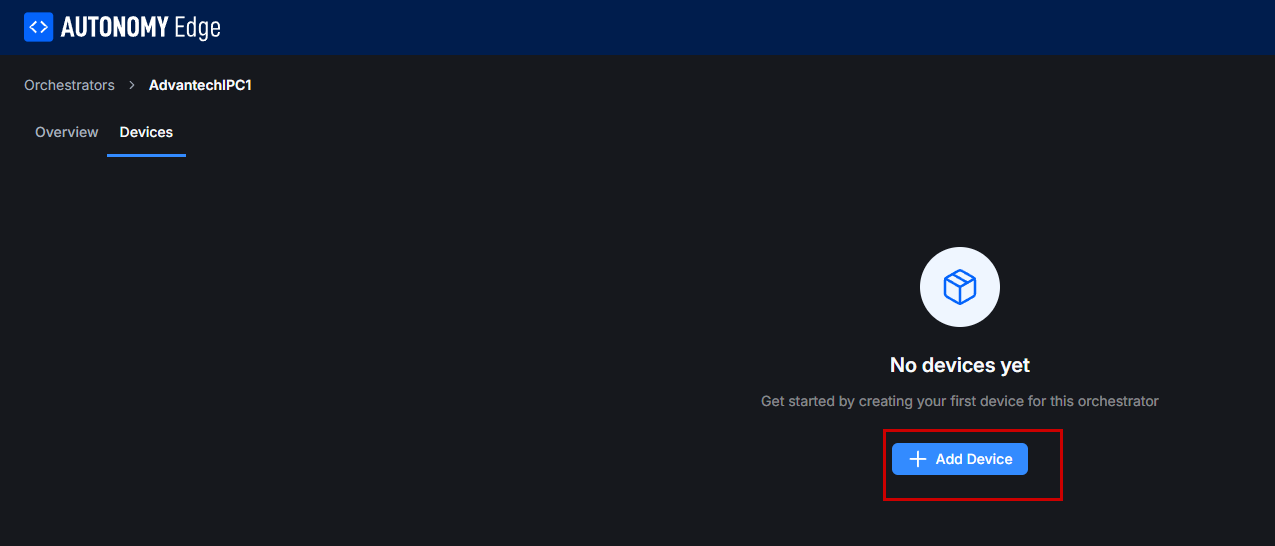
This is the new vPLC creation screen.
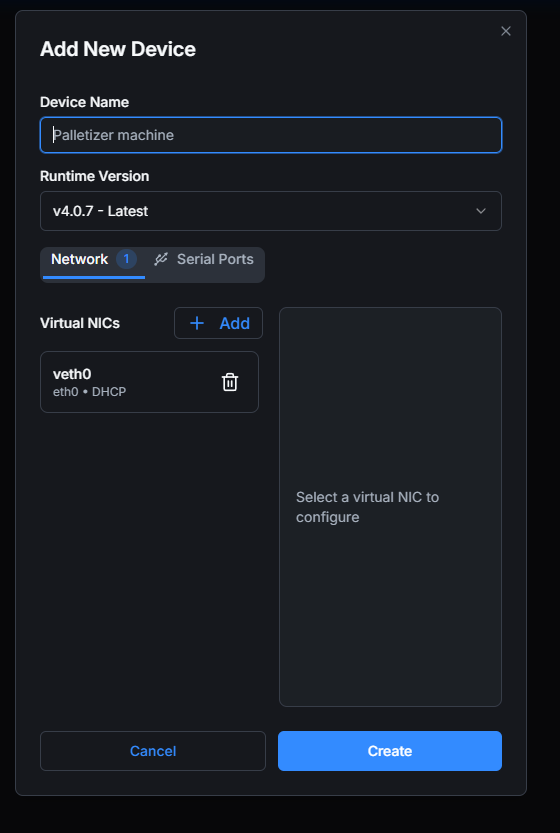
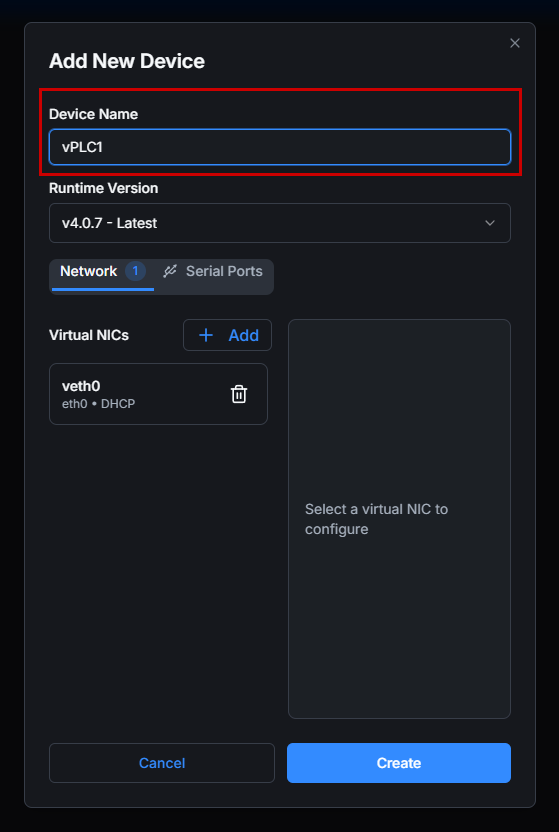
Device Name
First, set the name of the vPLC.
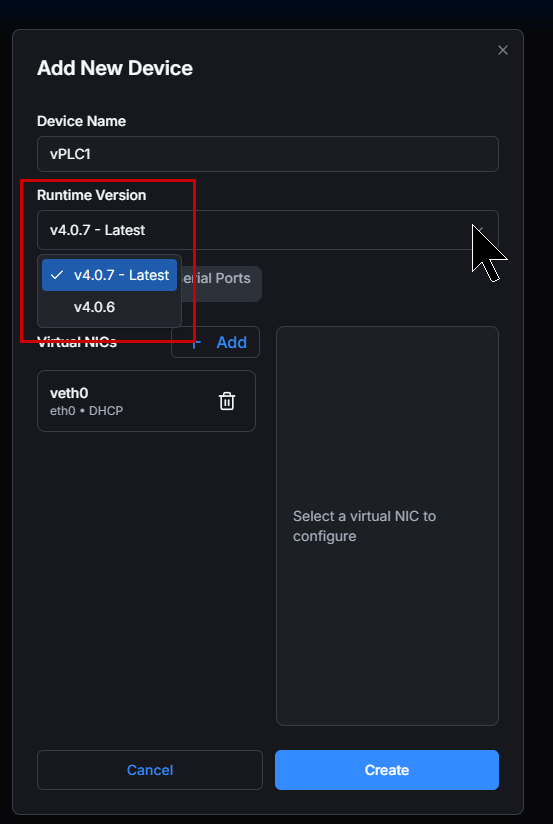
Runtime Version
Next, configure the vPLC Runtime version.
NICs
Next, we will configure the network interface card.
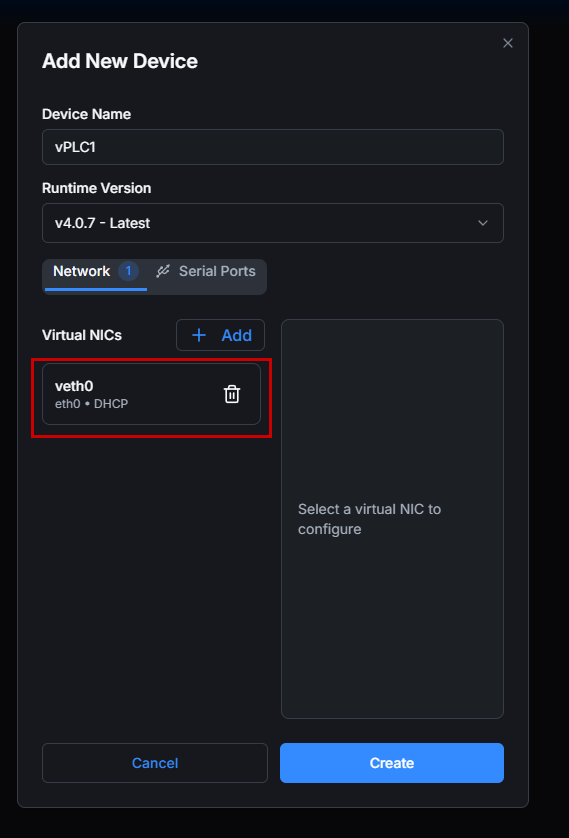
You need to configure it according to the actual application.
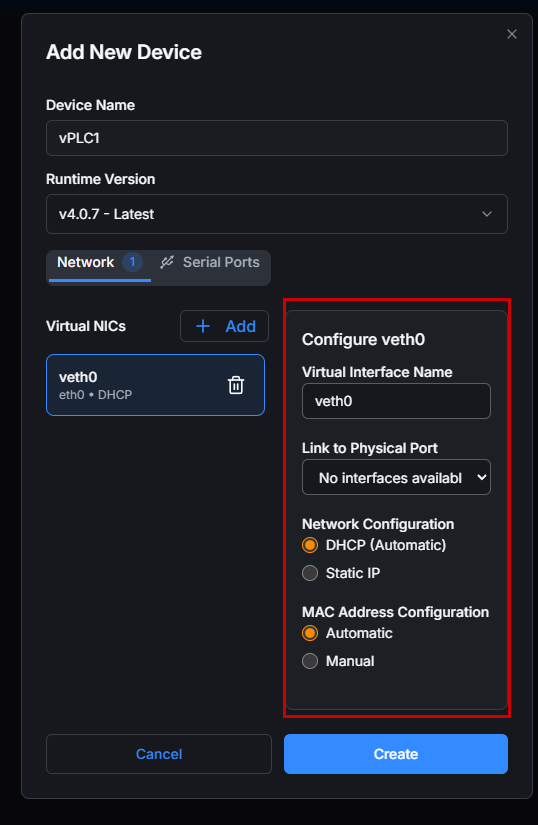
In the Drop-list for Link to Physical Port, configure the Ethernet port of the IPC that will actually use that vPLC.
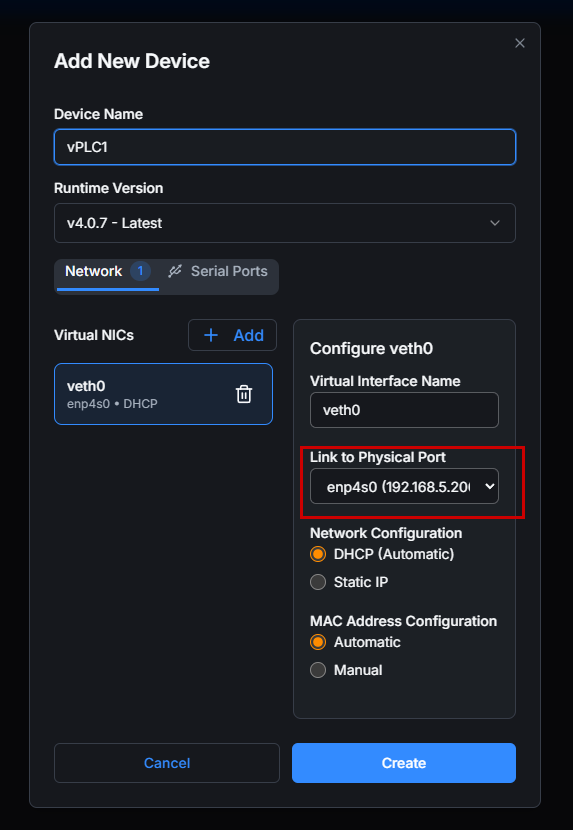
Finally, proceed with Create.
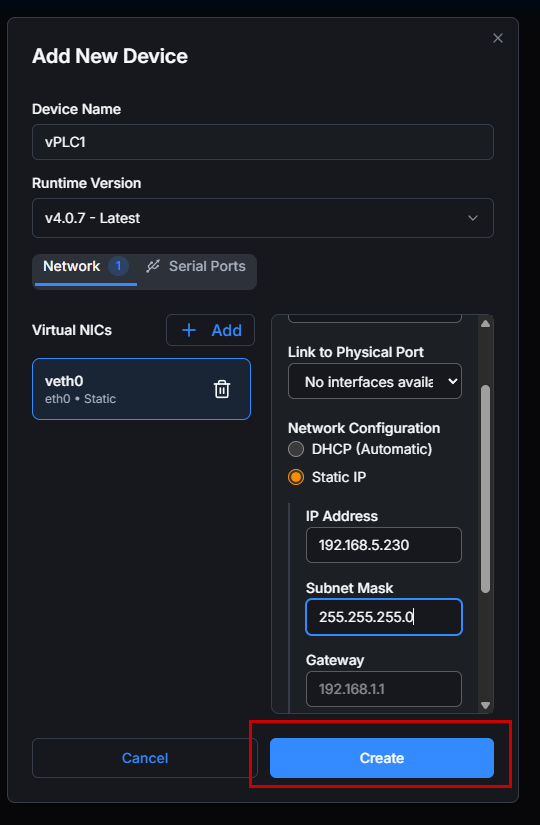
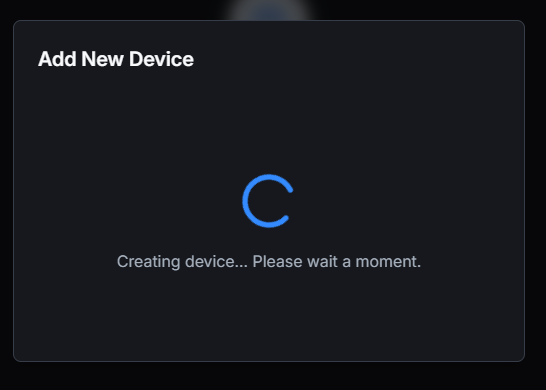
Just a second..
Done!
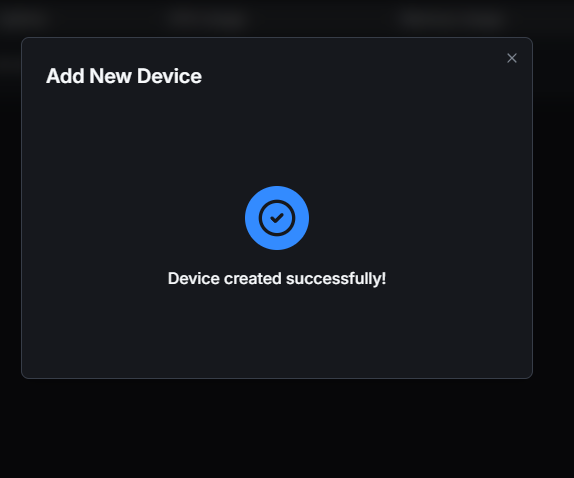
Result
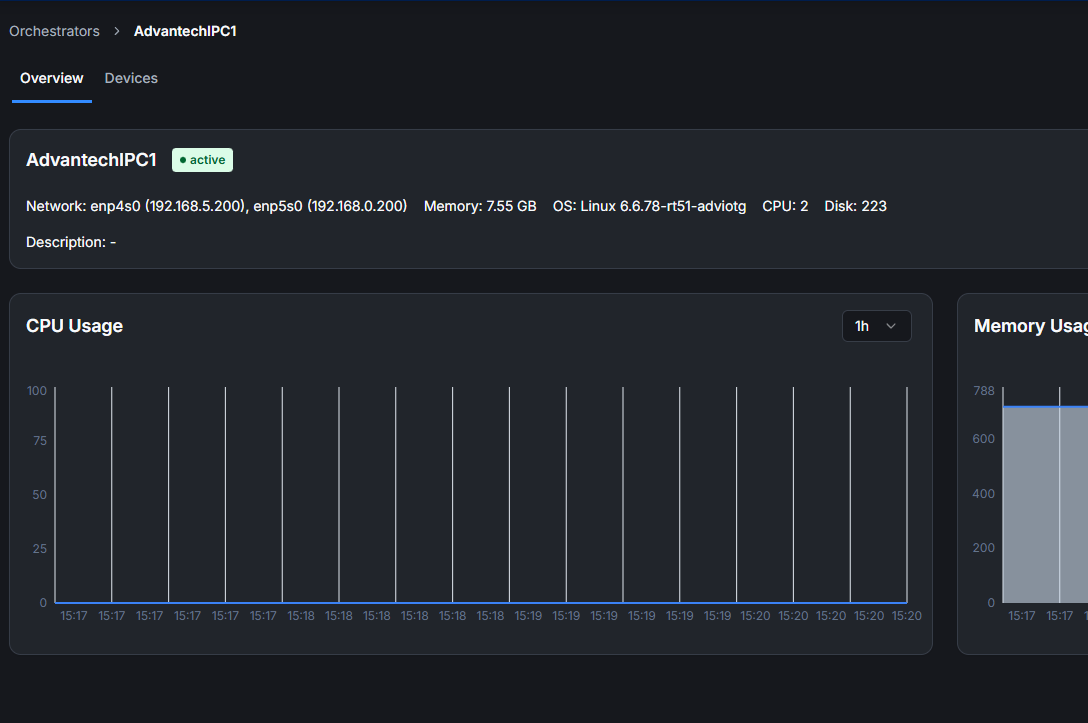
Done!You can also check the CPU and memory usage of Advantech’s IPC from the Dashboard.
Create multiple vPLCs
Using the same procedure as before, create another vPLC and modify only the network settings.
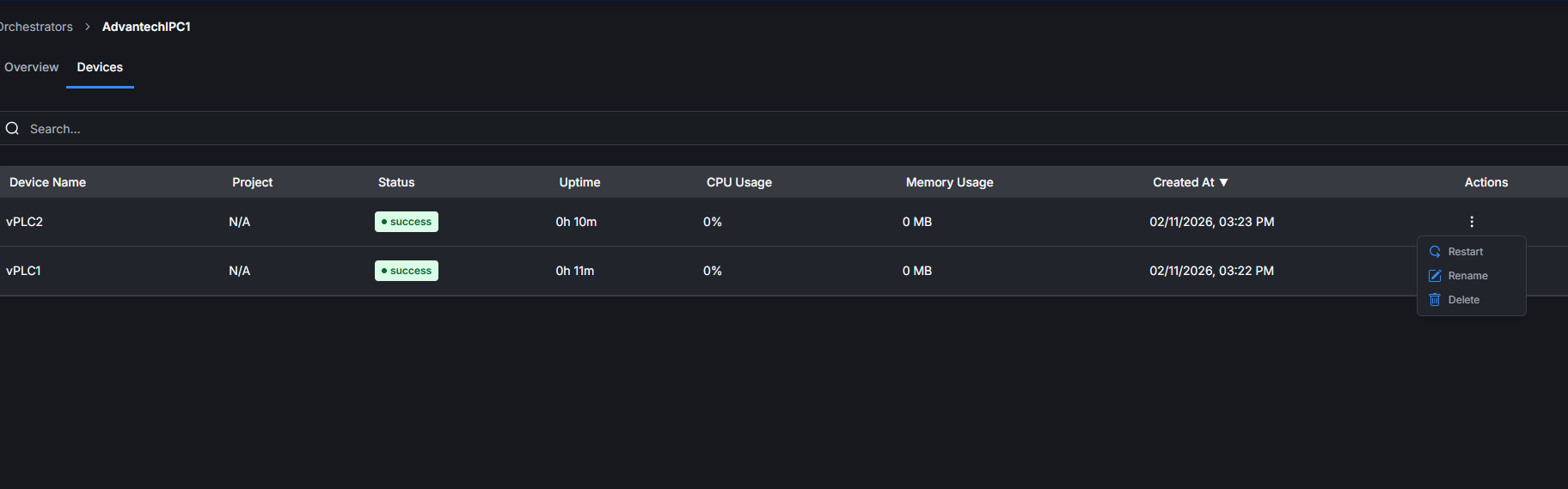
Result
Open OPENPLC V4 Editor, go to Device→Configuration, enter the IP address you just set for the device, and connect.
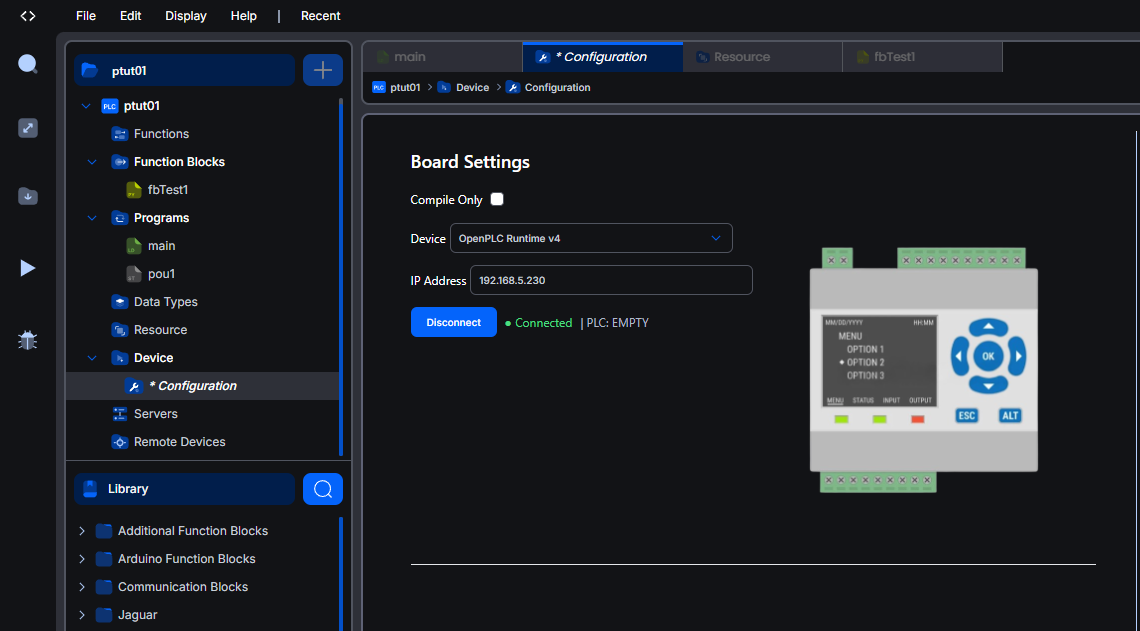
Also, download the Part 3 project and verify its actual runtime behavior.